
Five pages#
Tap BOOT to turn the page. Every number carries its unit, every status colour comes with a word, and a value the car does not give shows as a dash, never as a made-up figure. The pictures are renders with example values, not photos.
1 · Dashboard#
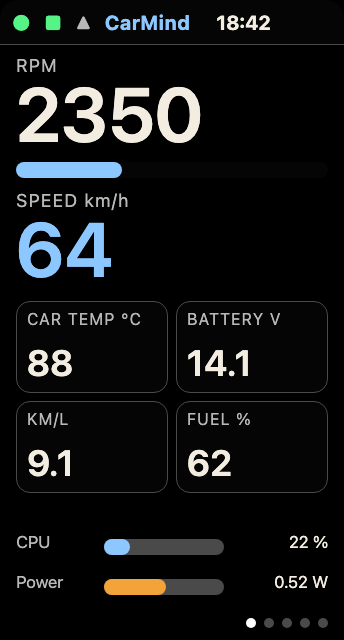
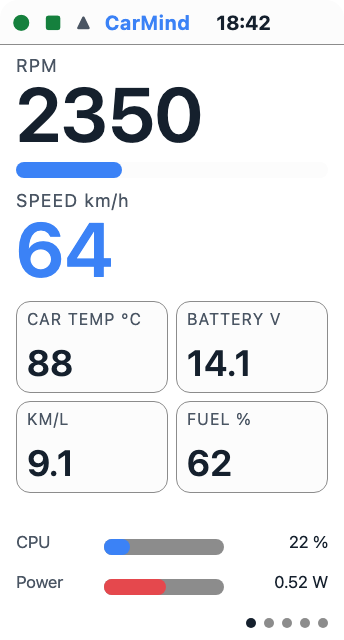
Left: Dashboard, dark theme. Render, example values. Right: Dashboard, light theme.
RPM: engine speed, with a bar
Speed: road speed in km/h (mph in the US and the UK)
Car temp: engine coolant temperature in °C (°F in the US)
Battery: the car’s battery voltage in V
Economy: fuel economy in km/L (mpg in the US and the UK)
Fuel: the fuel level in %
CPU, Power: how busy both cores are, out of 100 %, and an estimate of the board’s own power draw in W
Top row: status dots, the CarMind name and the time
2 · Details#
[Capture coming] Details: no picture without a VIN on it yet.
Plain text about the link and the drive.
Adapter: the adapter’s name, its address, “(saved)” once it is remembered, and its signal strength. Planned for a later S3 release, off in this source by default (
CONFIG_OBD_BLE_PAIR_CONFIRM): “paired” or “not paired” in place of the address.VIN: the car’s vehicle identification number, if it reports one
Protocol: the OBD protocol the car uses
Trouble codes: the MIL (check-engine light) state and the stored and pending codes
Clock, SD: whether the clock is synced, and the SD card’s state
Fuel used: fuel used this drive
3 · Internals#
[Capture coming] Internals: no picture without a network name on it yet.
Twelve extra engine fields and up to eight custom PIDs. A custom PID is an extra value your car offers that you add yourself, in custom_pids.csv on the card.
Timing: ignition timing in °
STFT, LTFT: short and long fuel trims in %
Load: engine load in %
Boost: manifold pressure in kPa, shown above the outside air pressure when the car reports both
Cat: catalyst temperature in °C
Rail: fuel rail pressure in kPa
Fuel: fuel rate in L/h
Run: engine run time in minutes
MIL km: distance driven with the check-engine light on (MIL mi in miles)
Pedal: accelerator pedal position in %
Odo: the odometer in km
Below the fields are the recent events: Wi-Fi joined, clock set, and the “Safe to turn off” line.
4 · Faults#
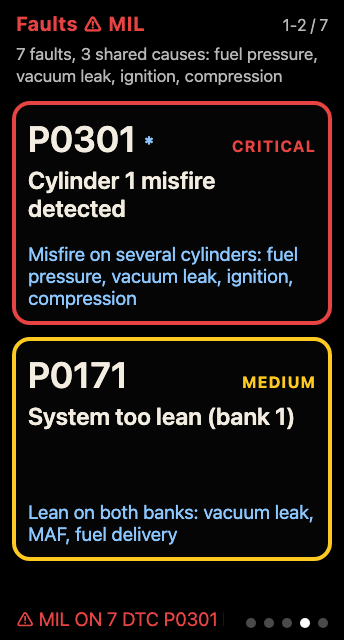
Faults, dark theme. Render, example codes.
Trouble codes ranked by severity. Each one has its severity in words (CRITICAL, MEDIUM and so on), a plain description and its likely cause. The page groups codes that share a cause, and the top line names the shared causes.
The bottom line shows the connection and MIL status.
5 · System and AI#
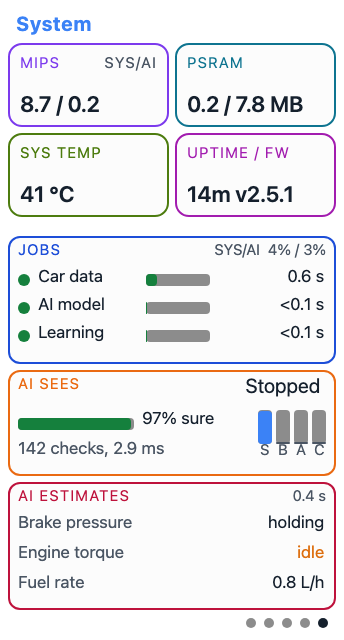
System with R.E.V, light theme. Render, example values.
MIPS: millions of instructions per second on each core, from the chip’s hardware counters. SYS runs Bluetooth, the Wi-Fi clock and the display. AI runs the car data, the model and the learner.
PSRAM: the external memory in use, out of the total
Sys temp: the chip’s own temperature
Uptime, FW: time since start and the firmware version
Jobs: each job (Car data, AI model and, with R.E.V, Learning) against its deadline. A green dot means it is on time.
AI sees: the model’s call on the last 5 seconds, how sure it is, and a bar for each class: S (stopped), B (braking), A (accelerating) and C (cruising)
AI estimates: brake pressure, engine torque and fuel rate. An estimate in amber means the car gave no reading to check it against.