
Network guard#
The network guard watches the Bluetooth and Wi-Fi traffic the board already receives, for floods of new Bluetooth addresses and rotating Wi-Fi access points. For the first 2 hours after every start it only learns and blocks nothing. A block only does safe, reversible things, and it never cuts your adapter during a drive. The messages it shows are in the manual.
How the intrusion detector works#
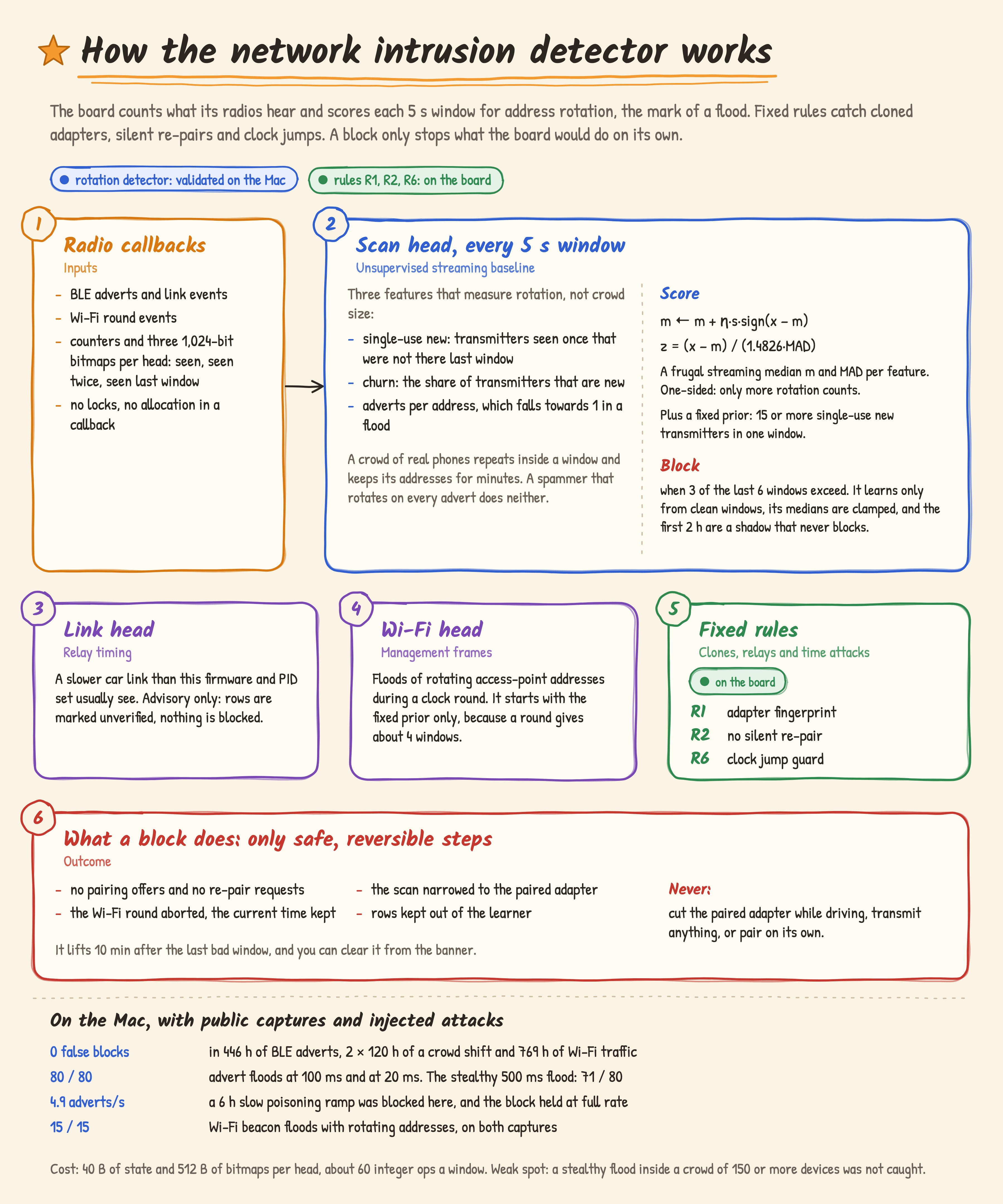
The detector looks for a transmitter that changes its address on almost every advert, which is how Bluetooth spam floods and prompt-spam tools look. Each radio callback only sets bits and adds to counters. Every 5 s the IDS service turns three 1,024-bit bitmaps (seen this window, seen twice, seen last window) into three features:
single-use new: transmitters seen once that were not there in the last window,
churn: the share of transmitters that are new,
adverts per address, which falls towards 1 in a flood.
A crowd of real phones repeats inside a window and keeps each address for minutes, so these features stay low in a busy car park. A raw count of adverts would not.
For each feature the board keeps a frugal streaming median m and median absolute deviation (MAD)[25]. After each window the median moves one small step towards the new value, m ← m + η·s·sign(x − m), where η is the step and s the feature’s scale. Over time m settles where half the values lie above it, and it costs one number per feature. The MAD follows the same rule on |x − m|. Scoring is one-sided, z = (x − m) / (1.4826·MAD), so only more rotation counts. With the factor 1.4826 the MAD equals the standard deviation for Gaussian data. A fixed prior adds that 15 or more single-use new transmitters in one window is a flood whatever the board has learned. A block starts when 3 of the last 6 windows exceed. The first 2 h are a shadow that learns and never blocks. After that the baseline learns only from clean windows, and its medians are clamped, so a slow poisoner cannot drag them into flood territory.
A block only stops what the board would do on its own. It offers no new adapter and asks for no re-pair, narrows the scan to the paired adapter, aborts the Wi-Fi clock round with the current time kept, and keeps the rows out of the learner. The block lifts 10 minutes after the last bad window, and you can clear it from the banner. It never cuts the paired adapter while you drive, never transmits, and never pairs on its own. Cloned adapters, silent re-pairs and clock jumps are left to the fixed rules R1, R2 and R6 in Pairing safety. A link head that watches for relay delay is advisory only: it marks rows unverified and blocks nothing.
The data: a public BLE scanner data set, used for local testing only (nothing fitted on it ships), the UJI Probes[27] and IPIN2021[28] Wi-Fi probe-request captures, and a synthetic crowd of 5 to 300 devices for the busy car park. Attacks were injected into them.
Test on the Mac |
Result |
|---|---|
False blocks on normal traffic |
0 in 446 h of BLE adverts, 0 in 2 × 120 h of a crowd shift, 0 in 769 h of Wi-Fi management traffic. Target ≤ 0.05 per hour |
Advert floods at 100 ms and 20 ms |
80 / 80 each, blocked 10 to 15 s after the start |
Stealthy flood at 500 ms |
71 / 80. Inside a synthetic crowd of 150 or more devices: 0 / 15 |
Slow poisoning, 0 to 50 adverts per second over 6 h |
blocked at 4.9 adverts per second, and the block held at full rate |
Wi-Fi floods of fake access points with rotating addresses |
15 / 15 on both captures |
Cost |
40 B of state and 512 B of bitmaps per head, about 60 integer ops a window |
On the Mac the detector is bit-exact against its Python reference on 21,601 test windows. It is in the firmware since 2.1.0 as the network guard (T 5 s, D 1 s), and after every start it spends 2 h in shadow mode, logging and never blocking. In the 2.1.0 board check it scored 0 to 34 of 256 over 112 shadow windows with 0 blocks. A real block has not been seen in use yet. The block card shown so far comes from the test build, and a week of logs from real car parks will show its false-block rate on the board.
The status of each AI service on the board is in the table on AI services.